Extracting Emails from Gmail with Google Takeout and the mbox Format
Most CloudMailin work is forward-looking. You point an inbound address at
your app and start receiving mail from now on. But every so often the
question comes up the other way around: we already have years of email
sitting in Gmail. How do we pull it back out and put it somewhere useful?
The answer is Google Takeout plus a slightly old-school file format
called mbox. In this article we'll walk through what Takeout gives you,
how mbox works, and how you can bridge that one-shot archive into the same
kind of webhook pipeline you'd use for live email.
Why pull email out of Gmail at all?
A few real cases we've come across recently:
- Backfilling an archive system. You've built a document store that
ingests invoices, receipts, and reports going forward, but the supplier
has been emailing you for ten years. The archive feels half-built without
the history.
- Bookkeeping migrations. Pulling every supplier invoice email (the
payment processor, the hosting provider, the domain registrar) from the
last few years into an accounting workflow.
- AI indexing. Feeding historical correspondence into a vector store or
internal search so an LLM can answer "when did supplier X last raise
their rates?"
- Leaving a vendor. Migrating mail off Gmail entirely.
The second and third cases are the ones that actually pushed us to do
this ourselves. We needed several years of supplier invoices out of
Gmail to reconcile against our own accounts, a plain bookkeeping job.
Separately, a surprising amount of CloudMailin's institutional memory
lives in email: prices agreed with suppliers years ago, why one data
centre was chosen over another, what a customer was promised in a
support thread in 2019. All of it is technically in Gmail, but Gmail
search only finds what you can already half-remember: the right
keyword, the right sender, roughly the right year.
So alongside the invoice reconciliation, we've been backfilling that
historical support and business correspondence into a vector store,
where an LLM can run semantic search over it: retrieval-augmented
generation (RAG) over the company's email history. Ask "what did we
agree with that supplier in 2019?" and an AI agent with access to the
index can surface the actual thread, whether or not your question
shares a single keyword with it. None of that works, though, until the
email is out of Gmail and in a form a pipeline can process, which is
the real subject of this post.
In all of those cases, what you actually need is the original RFC822
message (full headers, full HTML body, attachments), not just
message snippets or a search UI.
Google Takeout: the right tool
Google Takeout (takeout.google.com) is Google's official "give me my
data" service. You pick which Google products you want data from, choose
a format, and Google produces an archive you can download.
For Gmail specifically:
- Visit
takeout.google.com.
- Click "Deselect all" to clear every product, then scroll down the
(long) alphabetical list of Google products until you reach Mail
and tick it. It's easy to miss among everything else Takeout can
export.
- Click the All Mail data included button next to Mail. This is
where the trick is: by default Takeout exports your entire
mailbox, which can be tens of gigabytes. Tick "Include messages with
these labels only" and pick a label.
- Choose archive format (
.tgz or .zip), a maximum archive size
(exports bigger than this get split into numbered parts), and
delivery (download link or drop into Drive).
- Wait. Small label-scoped exports can be ready in minutes; full
mailboxes can take hours or days and arrive as multi-part archives.
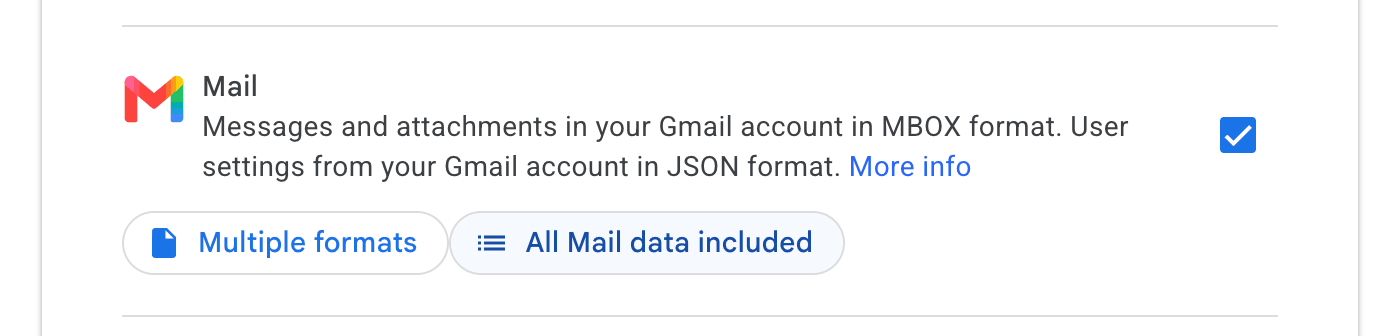
Note the two buttons: "Multiple formats" is just Google telling you
messages come out as mbox and settings as JSON, nothing to configure
there. "All Mail data included" is the one that matters. Click it, and
the label picker from step 3 opens.
Use a label as your scope
Takeout's label filter is the unsung hero here. Before you export, set
up a Gmail filter that labels exactly what you care about:
from:billing@vendor.example → apply label: project-invoices
also apply filter to existing matching conversations
Now your Takeout export contains only the messages you want, often a
handful of MB instead of a multi-GB whole-mailbox dump.
Inside the archive: meet mbox
Open the .tgz and you'll find a Takeout/Mail/ directory. Inside,
one file per label:
Takeout/Mail/project-invoices.mbox
That .mbox extension is the bit some people haven't seen before. It's a
format from the early days of Unix mail, the one Berkeley mail,
mutt, Pine, and Thunderbird all used at one point or another. It's
gloriously simple, which is why it's still in use today as the
lowest-common-denominator export format for tools like Takeout, Apple
Mail, and pretty much any IMAP client.
How mbox works
An mbox file is a single plain-text file containing many concatenated
RFC822 messages. Each message starts with a line beginning From
(note the space, not a colon) at column 0. That line carries the
envelope sender and a timestamp:
From billing@vendor.example Fri May  1 05:11:20 2026
Return-Path: <billing@vendor.example>
Received: from mail.vendor.example (...)
Subject: Your invoice for April 2026
Date: Fri, 01 May 2026 05:11:20 +0000
Content-Type: multipart/alternative; boundary="abc123"

--abc123
Content-Type: text/plain; charset=UTF-8

Hello,
Your invoice for April 2026 is now available...

--abc123
Content-Type: text/html; charset=UTF-8

<html>...</html>
--abc123--

From billing@vendor.example Wed Apr  1 16:26:59 2026
...next message...
Two things to know:
The From line is the envelope, not the From: header. Don't
confuse From billing@vendor.example Fri May 1 ... (with a space, no
colon) with From: Vendor Billing <billing@vendor.example> (with a
colon). The former is mbox's record separator; the latter is the
actual email header.
Gmail uses mboxrd, which escapes bodies. If a message body contains
a literal From at the start of a line (rare, but it's a common way
for emails to start), mbox-readers would mistake it for a
new message. The "rd" variant escapes those as >From . When you split
the file back into individual messages, you un-escape ^>From →
From .
You can read or split an mbox with almost any language. Python's
stdlib mailbox module handles mboxrd un-escape automatically:
import mailbox

mbox = mailbox.mbox("project-invoices.mbox")
for i, msg in enumerate(mbox):
    with open(f"{i:04d}.eml", "wb") as f:
        f.write(bytes(msg))
Each resulting .eml is a fully-valid RFC822 message you can drop into
a real mail client, parse with any MIME library, or feed back into a
webhook pipeline, which is where this gets interesting. First, some
hard-won warnings.
Gotchas worth knowing before you rely on the export
Takeout is genuinely good, but a few things will bite you if you treat
the export as infallible. All of these are cheap to check up front and
miserable to discover halfway through a backfill.
Large exports split into multiple archives, and so can a single
mbox. Takeout splits archives at the maximum size you chose (2 GB by
default). A big label (or an "All Mail" export) arrives as
takeout-...-001.zip, takeout-...-002.zip, and so on, and one
label's mailbox can end up split across parts. Download every part
before you start, and if you find more than one mbox fragment for the
same label, join them. Conveniently, mbox is just concatenation, so
cat part1/project-invoices.mbox part2/project-invoices.mbox > all.mbox
produces a perfectly valid mbox file.
Verify the message count. Before doing anything else, count what
you actually received. Two subtleties: Gmail's UI counts
conversations while the mbox contains individual messages, so 412
conversations might legitimately be 600 messages; and a message
carrying two labels appears in both labels' mbox files, so
multi-label exports contain duplicates. Count (and find your biggest
messages while you're at it) with a few lines of Python:
import mailbox

mbox = mailbox.mbox("project-invoices.mbox")
sizes = [(len(bytes(msg)), msg["subject"]) for msg in mbox]
print(len(sizes), "messages")
for size, subject in sorted(sizes, reverse=True)[:5]:
    print(f"{size / 1024 / 1024:6.1f} MB  {subject}")
If the number is wildly off what you expected, the usual suspects are a
label filter that was never applied to existing conversations, or a
missing archive part.
Character encoding is per-message, not per-file. An mbox file is
"plain text" only in the loosest sense. Each message declares its own
charset, and a decade of email means UTF-8 sitting next to
ISO-8859-1, Windows-1252, and the occasional message that declares
nothing at all. Never read the file as UTF-8 text: one stray byte in a
2009 message will crash the whole run. Open it as binary instead and
let a proper MIME parser deal with charsets part by part. Python's
mailbox and email modules do this, and so does any serious inbound
parser.
Very large messages exist. Old mailboxes hide bigger messages than
you'd expect, and attachments are base64-encoded inside the raw
message, adding roughly a third on top. If you plan to replay messages
over SMTP (next section), whatever receives them will enforce a
message size limit. Use the size listing above to find the outliers
before the replay and decide what to do with them (accept, skip, or
handle out of band) rather than discovering them as mid-run failures.
Why not just use the Gmail API?
A fair question. The Gmail API can return the raw RFC822 source of a
message (format=raw), so in principle you could crawl a whole
mailbox with it. In practice, Takeout wins for one-shot historical
extraction:
|
Gmail API |
Takeout + mbox |
| Setup |
Google Cloud project, OAuth consent screen, restricted-scope verification |
Log in, click, wait |
| Raw RFC822 |
One message per messages.get call |
Every message, in one file |
| Rate limits |
Per-user quota: a big mailbox is a long, throttled crawl with retry logic |
None; the export is prepared server-side |
| Ongoing sync |
Excellent (push notifications, history API) |
None; it's a snapshot |
The API is the right tool when you need continuous access to a
mailbox. For "give me everything up to today, once", Takeout gets you
the same raw messages with zero code and zero OAuth review, and
anyone in the company can trigger it, not just whoever owns the Google
Cloud project.
From archive to webhook
This is where CloudMailin enters the picture.
You've now got a directory of .eml files, each containing one
historical email exactly as it arrived in Gmail: original Date
header, full HTML body, every attachment, full MIME structure intact.
What if you could feed those into the same pipeline you'd use for live
mail?
That's exactly what we built internally: a small tool that splits an
mbox export, then delivers each .eml over SMTP to a CloudMailin
inbound parser address. CloudMailin's existing pipeline handles the
rest the same way it handles live mail: MIME parsing, attachment
extraction to S3, JSON-or-multipart delivery to your webhook. Your
downstream system doesn't need to know whether an email arrived in
2014 or last Tuesday: it's the same payload shape either way.
For our own use we've backfilled a few hundred historical supplier
invoices that way: splitting a single project-invoices.mbox into
individual messages, SMTP-pushing each to a parser address, and
watching them land in the same archive system that handles new
invoices today, which is what finally let us reconcile them properly.
More recently we did the same with years of support and business
correspondence, feeding it into the search index described earlier so
the LLM answering "what did we agree in 2019?" has the actual 2019
thread to cite. Original dates, HTML bodies, and full headers all
preserved.
Two details matter more than the happy path suggests.
Pace the replay: you look like a bulk sender
A loop that fires thousands of messages at an SMTP endpoint as fast as
the connection allows is indistinguishable from bulk sending, because
technically that's what it is. Mail infrastructure is built to push
back on exactly that behaviour: expect deferrals (421/450
responses), greylisting, or connection throttling if you blast away.
Be a polite sender instead: keep one SMTP connection open rather than
reconnecting per message, sleep a little between sends, and treat a
4xx response as "try this one again later", not as failure. A paced
replay of tens of thousands of messages takes an hour or two, which is
a perfectly good trade for a one-off backfill.
Make the replay safe to re-run
Sooner or later a backfill dies at message 6,000. The laptop sleeps,
the network blips. The run has to be resumable without re-delivering
the first 5,999 messages. The cheap, robust answer is a sent-log keyed
on Message-ID: record each accepted ID, skip it on the next run.
(Nearly every message has one; for the rare stragglers that don't,
hash the raw bytes instead.) Putting pacing and resumability together:
import mailbox, pathlib, smtplib, time

sent_log = pathlib.Path("sent.log")
sent = set(sent_log.read_text().split()) if sent_log.exists() else set()

mbox = mailbox.mbox("project-invoices.mbox")
with smtplib.SMTP("cloudmailin.net") as smtp, sent_log.open("a") as log:
    for msg in mbox:
        msg_id = msg["message-id"]
        if msg_id in sent:
            continue
        smtp.sendmail("backfill@example.com",
                      ["your-address@cloudmailin.net"], bytes(msg))
        log.write(msg_id + "\n")
        time.sleep(0.2)  # be polite
It's also worth being idempotent on the receiving side: have your
webhook endpoint upsert on Message-ID rather than blindly insert, so
a double-delivery is harmless. That also quietly solves the
multi-label duplication problem from earlier: the same message
arriving from two mbox files carries the same Message-ID.
Where this is heading
This is internal tooling today, not a product surface, but it's the
kind of bridge we're seeing customers ask for more often:
- "I want to backfill the last three years of customer support
emails."
- "I want our email history in the vector store our AI agent
searches."
- "I want to migrate a legacy mailbox into our document workflow."
- "I want a webhook for historical mail, not just future mail."
If any of those sound familiar, drop us a line.
We'd love to hear about your use case, and depending on what we hear
from people, the mbox-to-webhook bridge might end up as a proper
feature rather than something we build for ourselves.
In the meantime, hopefully this is enough to get you started: Google
Takeout for the export, a tiny Python loop to split the mbox, and any
inbound parser to do the heavy MIME lifting on the other side.